Showing posts with label Google. Show all posts
Showing posts with label Google. Show all posts
12 November 2019
Embed Google Slides in your LMS
Hey y'all! Google Slides are an amazing tool that can be used in soooooo many amazing ways. If you are able to embed in your Learner Management System...Google Slides make putting information out there in easy ways! Here is are some quick examples of how to use Google Slides in BrightSpace/D2L that I put together for my teachers. Get a template of each Google Slide deck in the link under under each example...



03 February 2019
PD Badging - Part 2: The Badges
So in my last post, I introduced you to the PD Badging program I created for my school called the B.E.S. Tech Challenge. Now you are probably thinking what exactly must be done to earn a badge? Or the more popular question I receive, where do you get these cute badges from? Let me start by answering these questions, and more....
How do you choose what tools or topics you create badges for?
I have a couple different ways I choose what tools or topics I will offer badges for.
- My school district has a set of evidence-based pedagogical strategies supported by the district for use in every classroom called the Quality-Plus Teaching Strategies. Each strategy has tools that help support the use of these strategies. I want teachers at my school to have the knowledge of how to use these tools in their bag of tricks, so those are included (or being worked on being included) in my PD Badging program.
- I take the recommendations of ed tech tools and topics from other technology coordinators and coaches as well as those I have collaborated with on the work for this PD Badge program.
- I also take the recommendations and suggestions for badges from the teachers at my school. I love hearing what tools and topics they about which they have heard and would like to learn more.
What must be done to earn a badge?
To earn a badge, learning as well as evidence of that learning must be completed. Learning through videos and other websites are available through the badging website. While record my own screencasts as well, I rely on videos posted on YouTube as well as tutorials posted by others on websites and other bloggers. I am also available to teachers to help them through their learning.
 Once the learning is complete, evidence of that learning needs to be submitted. Evidence is usually creating something using that tool by the teacher or the student. Or evidence could be a score report from using a tool in a lesson. Whatever the evidence is, the teacher is encouraged to use the learning they are doing in a lesson.
Here is an example of one badge and what must be completed in other to earn a badge, Animoto Level 1...
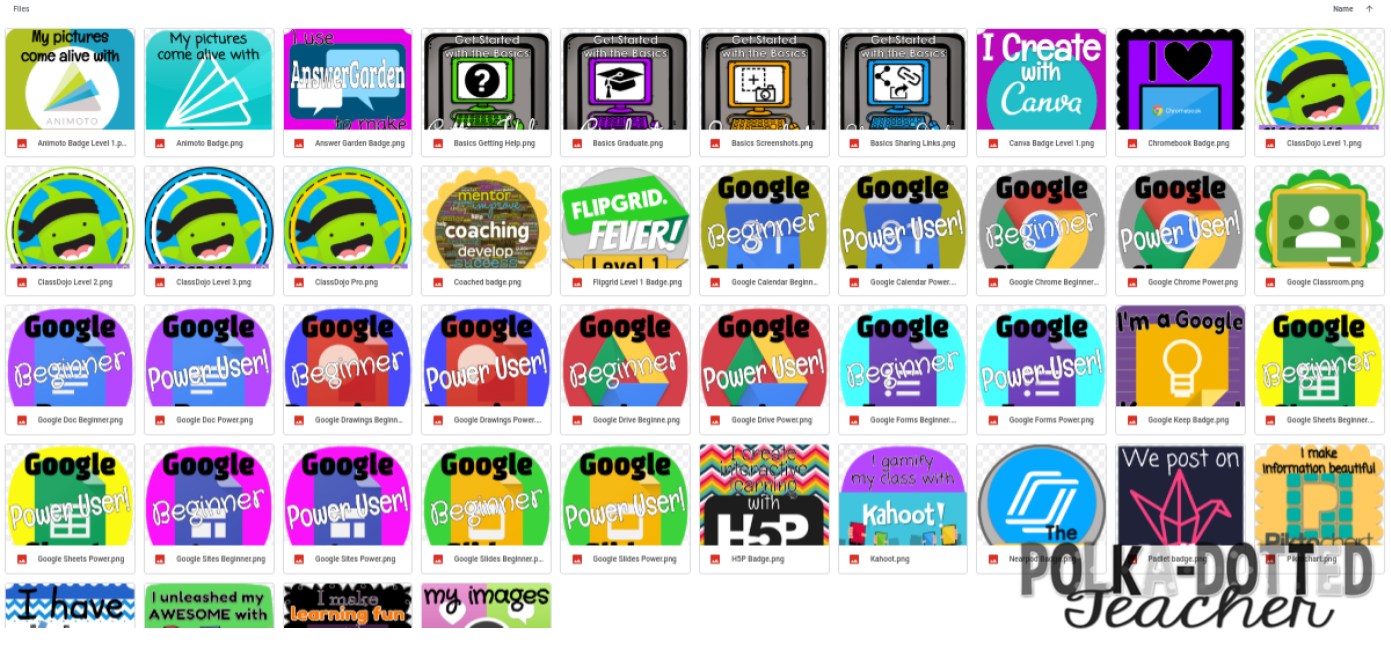
Just click here to access the Google Drive folder where you can download a copy of the badges you would like use.
 Once the learning is complete, evidence of that learning needs to be submitted. Evidence is usually creating something using that tool by the teacher or the student. Or evidence could be a score report from using a tool in a lesson. Whatever the evidence is, the teacher is encouraged to use the learning they are doing in a lesson.
Here is an example of one badge and what must be completed in other to earn a badge, Animoto Level 1...
- Create an Animoto account (if you don't already have one)
- Create a one-minute video aligned to your content area
- Get the link and include it in the badge request form
How do you create the badges?
I create the design for each badge using Google Drawing. Why Google Drawing and not another design program? Every design program has its benefits and purposes...I use multiple different ones depending on my project or mood! Google Drawing works perfectly for me and how I set up the back end of my PD Badging Program by being able to publish an image to the web.
When designing a badge, I use the shapes and fonts available in Google Drawing. I also use clip art from Miss Tiina, Creative Clips, Erin Bradley Designs, and Maree Truelove along with icons from The Noun Project. I also will usually include the logo of the particular tool or website the badge is for.
Where can I get your badges?
Unfortunately you cannot earn my badges. (sorry!) You also cannot buy my badges since I often create my badges using the logo from tools and websites belonging to others. But you are in luck...I am sharing the PNGs for badges I have created and will create with you...
Just click here to access the Google Drive folder where you can download a copy of the badges you would like use.
Do teachers get a physical badge?
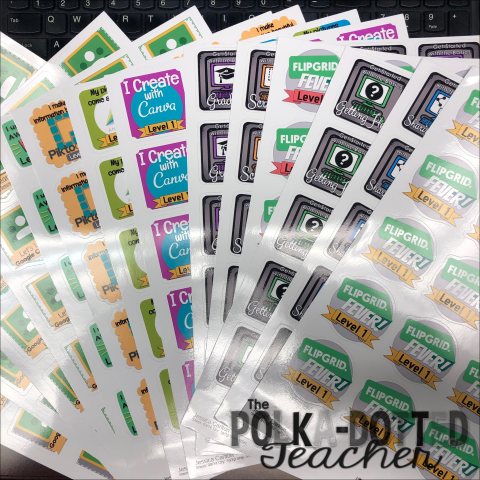
Yes! When a badge is requested and approved, the teacher gets a certificate of completion as well as a physical badge! The physical badge is removable vinyl sticker, which can be placed on most surfaces without leaving any residue. I use Sticker You.com because I have found it to be the most affordable. On Sticker You.com, I can get a sheet of 20-2 inch by 2 inch stickers for $9.99, but when you buy more sheets of stickers the cost of each sheet decreases.
I think I covered everything you could want to know about badges portion of my PD Badging program, but, if you have additional questions, please ask them in the comments! Be on the look out for more information about PD Badging.
02 February 2019
PD Badging - Part 1: The Program
A little back story...
One of my big tasks as a local school technology coordinator/technology coach is providing professional development related to technology and technology integration for the teachers in my school. For the time being, my major time to do this is on the three teacher workdays within the school year. But I knew that in order to help teachers grow and emphasize the importance of tech integration, this was not enough (just look at this month's Educational Leadership from ASCD, which focuses on The Tech Savvy School).
My first attempt was "Y'all Come" sessions before or after school. But between, collaborative planning meetings, IEPs, and other teacher tasks, the numbers that would be able to come were tiny...1 or 2 out of 60+ staff members (which I TOTALLY understand)! I knew this was still not good enough!
After a little reading, my own professional learning, and some collaborating with colleagues inside and outside my school system, I came up with the B.E.S. Tech Challenge...

Part One: What is PD Badging? And how does it work?
PD Badging is a personalized learning format that allows teachers to add to their knowledge and bag of tricks in ways that are "relevant, valuable, and engaging". (eSchool News, "How digital badges are shaking up teacher PD") The teacher gets to choose what they want to learn to benefit him or herself, in turn, receives recognition for his or her work in the form of a badge. PD Badging programs do not have to just be about technology; others have created programs for all areas that would benefit teachers and student achievement.
The program I developed, the B.E.S. Tech Challenge, is a voluntary program. I have borrowed work from a colleague in a nearby school district, Caroline Bucky-Beaver, Instructional Technology Coordinator for the Barrow County School System (Georgia). She introduced the PD Badging System called Ed Tech Innovation Challenges. (She is a PD Badge MASTER! And I thank her soooooooooooooo much for taking time to answer questions that I have had in developing my own program)
Currently I have developed 42 badges, but I am work on creating more badges whenever I have free time. Here are some more specifics:
- Each badge has some form of learning. Learning may take place as a video or article, but there are even badges for receiving coaching too.
- Each badge requires some form of evidence. Teachers may need to take a screen shot, the link to the product created with a digital tool, or a report from using the tool in a lesson. All evidence is encouraged to be used in lessons in the classroom.
- Each badge is worth a number of XP or experience points. The more experience points a badge is worth the more advanced the badge is.
- Teachers can work together to complete their learning and produce evidence of that learning. We will also have on occasion times when in person staff development will count for badges.
- When a teacher has completed all the tasks required for a badge, he or she completes a badge request Google Form where the evidence may also be submitted.
- Once I approve that all tasks have been completed, then I approve the badge, send the teacher a certificate through email, and then issue the teacher a sticker badge.
Coming soon...Part Two: The Badges
28 June 2018
My first Google-y Product Update - A Meteorologist's Helpful Tools
Good morning! Are you out on Summer Break like I am? I actually have been out since Memorial Day, but I have been keeping super busy taking classes (I'm getting my coaching endorsement this year!) and TEACHING classes to staff at my school. So now I'm officially on Summer Break with no school responsibilities until the last week of July! (But really who am I kidding...my to-do list is already a mile long!)
So what do I do on my first day of official freedom...I update a product for you! And guess what!?! It's all Google-y! Oh...and interactive notebook-y! But still all kinds of fun for your students!

So what do I do on my first day of official freedom...I update a product for you! And guess what!?! It's all Google-y! Oh...and interactive notebook-y! But still all kinds of fun for your students!
Weather Instrument Cut & Paste has been updated to A Meterologist's Helpful Tools. Click on the picture above to get yours! Students will still be matching names of weather tools to their descriptions. But now includes 3 fomats:
- The original letter-sized (which will fit into a spiral notebook for interactive notebooking)

- *NEW* Composition book-sized (this was my preferred size for interactive notebooking when I was in the classroom)

- *NEW* Google Drive format - DIGITAL CUT & PASTE! - give your student their own copy through Google Classroom (or create a Force A Copy link) and students will drag and drop the names and descriptions.


You can get your updated copy on TeachersPayTeachers! I hope you enjoy these updates! Let me know what you think because I am working to update more of my products like this one!
06 April 2018
Leafy Green Plant Life Cycle
Hey y'all! I hope you have been enjoying the arrival of Spring! Like most of the country, here in Georgia, we still can't quite put away the winter clothes yet, but at the same time everything is covered in a thin layer of sneeze-inducing, yellow pollen.
But you know all that pollen is a good thing...it means all around us plants are growing! I have a resource to share with that will help your students learn about what is happening this time of year. Introducing the Plant Life Cycle Multi-media Text Set...


Get your copy of this resource by clicking on either then links of picture above. Then click on the USE TEMPLATE button. You will now have a copy of the the Plant Life Cycle Multi-media Text Set in your Google Drive and can remix if you like.

But you know all that pollen is a good thing...it means all around us plants are growing! I have a resource to share with that will help your students learn about what is happening this time of year. Introducing the Plant Life Cycle Multi-media Text Set...
In the Plant Life Cycle Multi-media Text Set I have gathered a variety of resources to help your students learn about how plants grow and the steps in the life cycle. I have included a variety of media including:

- videos--including three really cool time-lapse videos of spinach, beans, and an oak tree growing
- reading
- interactive activities
- unlinked observe block--an empty block for you to integrate your choice of plant observation journal whether you would like to link a digital version or direct your students to their paper copy --->
Get your copy of this resource by clicking on either then links of picture above. Then click on the USE TEMPLATE button. You will now have a copy of the the Plant Life Cycle Multi-media Text Set in your Google Drive and can remix if you like.
10 March 2018
Sorry no cookies included in this post...
I have been working with the second grade teachers at my school to incorporate more techy, interactive activities in science and social studies. In the state of Georgia the social studies standards were revised this year to incorporate a new famous Georgian: Juliette Gordon Low. To help out my second grade teachers, I created this Google Slide HyperDoc below:
My teachers are using this HyperDoc in a couple different ways. Some have used the materials whole class while others are having their students make a copy into their Google Drive. Either method both the teachers and students are loving getting to learn about this amazing woman in this way!
*Note* Due to restrictions in my school system on YouTube for students, all videos have been downloaded into my Google Drive then shared. Links to the original YouTube videos are in the Works Cited slides if needed.
Students get to learn about Juliette Gordon Low's life in a variety of way including videos, articles, and an interactive timeline.

Students demonstrate their learning by completing activities in Google Drawing including a timeline,


and character trait graphic organizer.


*Note* Due to restrictions in my school system on YouTube for students, all videos have been downloaded into my Google Drive then shared. Links to the original YouTube videos are in the Works Cited slides if needed.
Students get to learn about Juliette Gordon Low's life in a variety of way including videos, articles, and an interactive timeline.

Students demonstrate their learning by completing activities in Google Drawing including a timeline,
a Venn Diagram comparison with either Jackie Robinson or Martin Luther King, Jr.,
Printable versions of these activities are included in the notes section of the Google Slide.
Students also had the choice between two final projects to complete for the study of Juliette Gordon Low. They could choose to decorate a cookie box to represent Juliette Gordon Low
 or create a badge for Juliette Gordon Low.

You can get your own copy of my Juliette Gordon Low HyperDoc by clicking here or on the picture below:
I hope you enjoy using this HyperDoc if you are a Georgia second grade teacher or would like to study Juliette Gordon Low as part of Women's History Month. Feel free to share with me what your students do with this HyperDoc!
28 February 2018
Leveling Up our Googley-ness
Hey y'all! I feel like I need to give you a little more explanation on my current adventures in education. My job title within my school district is Local School Technology Coordinator, but all those words mean that I am a technology instructional coach. I spend my days getting to serve and work with the teachers in my school building on implementing the use of technology authentically and effectively to help them deliver content. I LOVE IT!
This year has been a HUGE year for my school technology-wise! We have become a G Suite for Education school! This was made possible by my school district, so our G Suite for Education experience is a little different than most schools out there. Here are some things we are working through:
You will notice this round of professional development has a theme...here's a hint...
 We first learned some goodies that you can do with Google and about sharing settings...


This year has been a HUGE year for my school technology-wise! We have become a G Suite for Education school! This was made possible by my school district, so our G Suite for Education experience is a little different than most schools out there. Here are some things we are working through:
- NO Google Classroom -- We already have a learner management/online classroom program
- No YouTube for students (this was not a new but crossing my fingers that may be in the works to change)
- No Gmail for anyone
- No Groups or Hangouts
But since this G Suite is new for most of my teachers...they don't feel these growing pains. We are finding a lot of materials that use these to tools, and it is my job to get creative and find ways to do the same job but in other ways.
Since G Suite is new to my school, I have also been doing A TON of professional development to help my teachers learn ways to use Google Apps to deliver content. Recently, I just happened to do a professional development session...and it took FOREVER to prepare! Since it did, I wanted to share it with you to maybe help you out!

If you would like your own copy of this presentation to adapt for your staff, you can get your own copy here.
Then we learned about how we can use G Suite tools to help us deliver content for our students. I designed a HyperDoc for self-paced, self-guided learning in a Google Form...

This HyperDoc was divided into different sections.. First, we reflected on the good things we have found already about using G Suite...
 |
| We did this in AnswerGarden... a great tool for brainstorming and collaborating on ideas. Check it out at https://answergarden.ch/ |
We looked again at why using Google apps are a good thing...

We looked at how Google tools can help us raise or teaching game...

We looked at resources that we could use to help us deliver content to our students...

I also took the opportunity to introduce my teachers to HyperDocs...

We also looked at how challenges are okay and how to solve them...

I also gave them a chance to enter for a door prizes of RocketOne Notebooks and Google stickers by completing a faux social media posting summarizing their learning for the day.

Here are some my teachers creations...


Like I said, I took a lot of time gathering all the resources and putting this professional development HyperDoc together, so I want others to be able to get use out of it too! Click here to get your own copy of the Level Up Your Googley-ness HyperDoc. I hope you enjoy leveling up your Googley-ness!

*Note -- I had all the questions except the bonus turned on as required questions. I turned off the required setting to allow you to move through the Google Form easier.
12 February 2018
The Hyperdoc Handbook...Highly Recommended Reading!!!
This year, my school became a Google G Suite for Education school. As I was planning staff development for my staff about the beauty of having Google Apps, I kept running across these things called HyperDocs. Oh my good gracious...I didn't even realize the amazing resource I stumbled upon!
If you haven't heard of hyperdocs, then you MUST know about them! Hyperdocs are a method of delivering instruction designed by The Hyperdoc Girls, Lisa Highfill, Kelly Hilton, and Sarah Landis.
Here is a little bit more about what HyperDocs are...
By using HyperDocs in your classroom, you can...


This book is a seriously an easy read for the busy teacher! (I definitely recommend having your own copy...I have referred to mine over and over! I got the eBook, so it was not only cheaper but it would be wherever I need it!) The Hyperdoc Girls provide all the knowledge and resources you need to start creating HyperDocs for your classroom, and they constantly update these resources too. The Hyperdoc Girls are also very active online on Twitter, Facebook, and Pinterest for guidance when needed! They have an awesome website at https://hyperdocs.co/ with all the resources you can want more. The TeachersGiveTeachers section of website also allows you to give and take HyperDocs too!
If you haven't heard of hyperdocs, then you MUST know about them! Hyperdocs are a method of delivering instruction designed by The Hyperdoc Girls, Lisa Highfill, Kelly Hilton, and Sarah Landis.
Here is a little bit more about what HyperDocs are...
 |
| from Hyperdoc.co |
- purposefully and deliberately choose web tools
- allow students to interact with content in various ways
- allow for digital student collaboration
- develop critical thinking and problem solving skills
- give students the opportunity to create authentic digital artifacts to show what they know
 |
| from Hyperdoc.co |
The HyperDoc Girls have outlined their ideas in The Hyperdoc Handbook . (seen below)

But even better than that, I took online PD, HyperDoc Boot Camp from The Hyperdoc Girls themselves...and I highly recommend it!
 This was one of the best PDs I have ever taken! I learned so much and feel more confident in my HyperDoc abilities after learning from the designers themselves! Because it was all online, I could work on it during my time, so it was low stress that way too!
 |
| Happily learning about HyperDocs! :) |
I am have been a Hyperdoc-ing fool since taking this class! Don't worry though, I will share with you the HyperDocs I create. Happy Hyperdoc-ing!
Subscribe to:
Posts
(Atom)








StickerMule
Advertisement


